Best authentication and passwordless MFA solutions for your business in 2026
Why 2026 marks a turning point for enterprise authentication?
For most of the last decade, “strong security” in a company meant one thing: a password plus something else. A one-time code sent by SMS, an app on your phone, a push notification you tapped half-asleep. It was a step forward compared to passwords alone but today, for a modern business, it’s no longer enough.
Attackers have evolved faster than authentication. Phishing-as-a-service kits intercept codes in real time. SIM-swapping makes SMS fragile. Push-fatigue attacks train users to approve login prompts without thinking. Meanwhile, IT teams are supporting remote workers, cloud apps, legacy systems and third-party access all at once. CTOs and CISOs aren’t asking whether to use MFA anymore; they’re asking which authentication models will still make sense in 2026.
That is where passwordless authentication enters the picture. It doesn’t replace MFA, it redefines it. Instead of adding more layers on top of passwords, it removes the password entirely and replaces it with stronger, cryptographic proof of identity. In this guide, we’ll walk through how multi-factor authentication works, how passwordless changes the game, and which solutions are worth evaluating if you’re deciding:
• What the best multi-factor authentication apps are?
• Which passwordless MFA options work for small businesses and enterprises?
• Whether you can deploy passwordless without smartphones?
• How to integrate all this into your existing cloud stack?
What multi-factor authentication is and how it works?
Multi-factor authentication (MFA) is based on a simple idea: don’t trust a single piece of evidence. Instead, require users to prove who they are using two or more types of factors. Traditionally this meant combining:
• A thing the user knows: such as a password or PIN.
• A thing the user has: such as a phone, smart card or hardware token.
• A thing the user is: such as a fingerprint or facial recognition.
A classic example is logging into a business email account. The employee enters a username and password, then confirms a code generated in an app or sent by text message. Even if the password is stolen, the attacker still needs the second factor.
On paper, this sounds robust. In reality, many of the most common MFA flows depend heavily on passwords and easily phished codes. That is why questions like “What are the best multi-factor authentication apps?” or “Which companies offer hardware tokens for multi-factor authentication?” are only half of the story. The more strategic question is: how much risk is left if your MFA still starts with a password?
Why businesses are moving beyond traditional MFA?
Traditional MFA has two main weaknesses. The first is the password itself, it’s reused across services, shared informally, stored in unsafe ways or captured in phishing pages that look identical to the real thing. The second is the nature of many second factors: codes that can be read, typed and forwarded, or push notifications that can be blindly approved.
In practice, this means attackers don’t need to “break” MFA; they just need to manipulate users. Phishing kits can ask for the password and the one-time code in a single flow. Social engineering can convince an employee to approve a suspicious login. SIM-swapping can redirect SMS codes. And because remote work has expanded, the number of opportunities to exploit these weaknesses has grown dramatically.
By 2026, more organisations will see classic MFA as a good baseline, but not an endpoint. MFA that still relies on passwords and manually entered codes will gradually be replaced by models that are phishing-resistant by design and that generate fewer support headaches for IT.
Types of modern authentication for your business in 2026
When technical leaders plan authentication roadmaps for 2026, they aren’t just comparing apps; they’re comparing models.
One model is still password-based MFA, where a password remains the primary factor and everything else is an additional layer. Another model is device-based and uses cryptographic credentials, such as passkeys, bound to a laptop or phone.
A third model is hardware-token centric: FIDO2 keys that store secrets on a physical device that never leaves the user’s possession. And a fourth, emerging model uses alternative forms of possession, such as images transformed locally into strong cryptographic material.
All of these can be wrapped in multi-factor logic: the device or token is one factor, a biometric confirmation is another, and contextual signals: location, risk scores, device posture, create an invisible third layer. In other words, MFA is no longer always “password plus app”; it can just as easily be “device plus proof plus context.”
When you think about questions like “What are the best passwordless MFA solutions for small businesses?” or “Are there passwordless MFA options that work without a smartphone?”, you’re really asking which mix of these models fits the way your organisation works.
Top 10 authentication and passwordless MFA solutions for your business in 2026
There is no single tool that fits every organisation, but there is a small group of solutions and ecosystems that keep appearing in serious enterprise conversations. The goal of this section is not to crown one absolute “winner”, but to give you a realistic picture of ten providers worth evaluating.
Microsoft Entra ID
For organisations deeply invested in Microsoft 365 and Azure, Entra ID feels less like an add-on and more like part of the operating system. Authentication flows across Outlook, Teams, SharePoint, Azure services and on-premises resources through a single identity layer.
Microsoft’s support for Windows Hello, passkeys and FIDO2 security keys allows you to move gradually from password-based login toward passwordless experiences, while conditional access policies let you tune the level of friction to the level of risk. If your question is “How do I set up multi-factor authentication on my email account and cloud storage in a Microsoft environment?”, Entra ID is usually the starting point.
Okta
Okta has become the reference point for identity in environments that are not tied to a single vendor. It connects to thousands of cloud applications, on-premises systems and custom-built tools, and it offers adaptive policies that respond to device, location and behavioural context.
For many large enterprises, Okta answers the question “Which multi-factor authentication solutions integrate with workplace collaboration tools and legacy systems?” by acting as the central hub. Its support for WebAuthn and hardware keys also means it can be the engine behind a gradual shift to passwordless authentication.
Cisco Duo
Duo is often chosen because it is easy to deploy and straightforward for users. It brings push approvals, biometric support and WebAuthn into a simple, consistent experience that works well for remote workers, VPN access and older applications.
When a company wants to move quickly from “no MFA at all” to “a solid baseline of multi-factor authentication for remote employees and contractors,” Duo tends to surface near the top of the shortlist. Over time, organisations can layer in more advanced policies and passwordless options without replacing the platform.
Google Workspace and Passkeys
For businesses built around Gmail, Google Drive, Meet and other Google services, Google’s native authentication is a logical foundation. Administrators can enforce multi-factor authentication for all accounts and increasingly encourage or require passkeys as a login method.
For small and medium-sized businesses, this often answers “What are the best multi-factor authentication apps for smartphones?” because employees are already used to Google prompts and the Google Authenticator ecosystem. As passkeys mature, Google’s model becomes more obviously passwordless rather than just MFA layered on top of passwords.
Secrets Vault – Secrets Vault Identity (Image-Based Passwordless MFA)
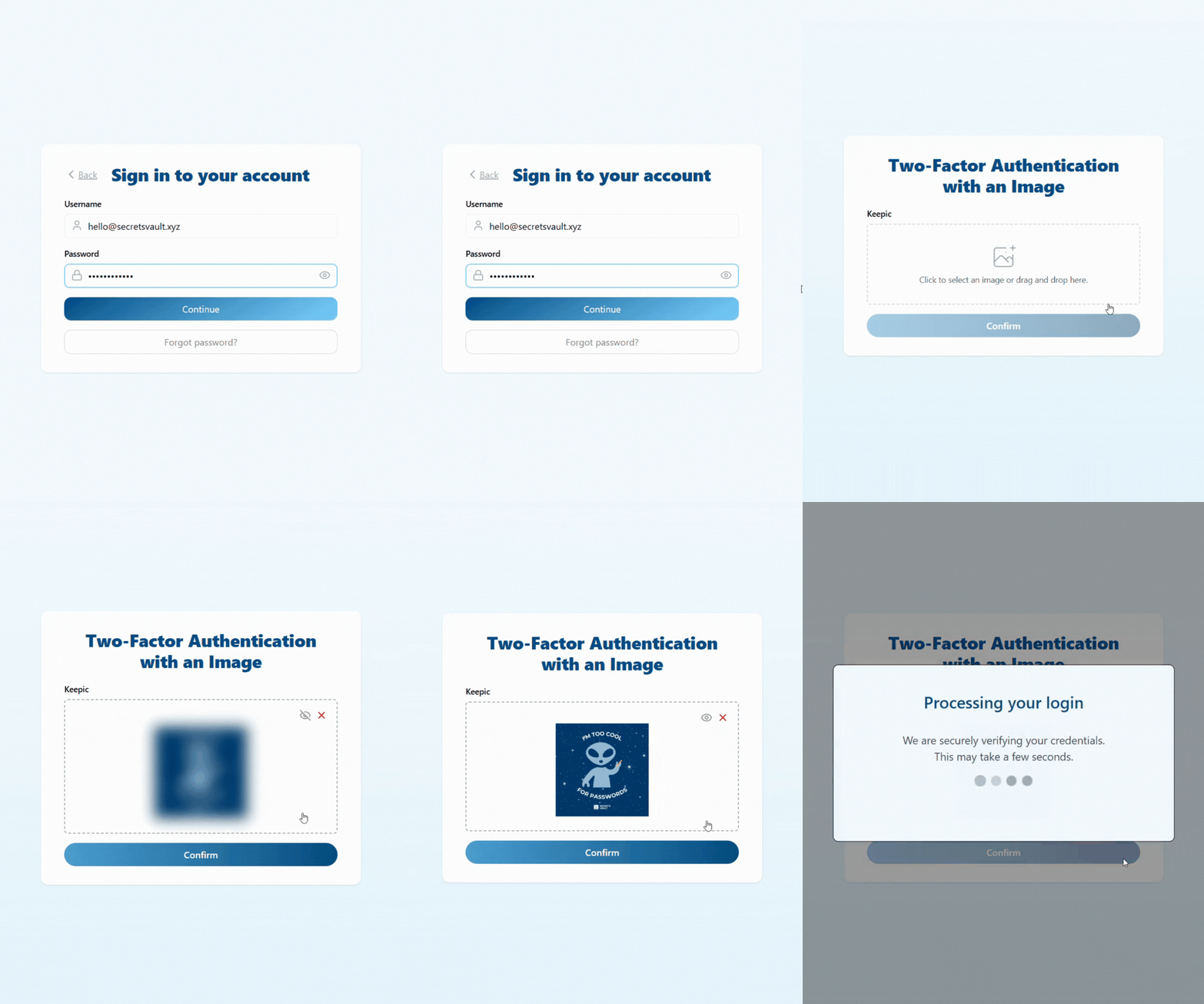
Secrets Vault represents one of the more innovative directions in authentication: using images as a possession factor. With Secrets Vault Identity, a user selects a personal image and, from that image, a cryptographic key is generated locally on their device using post-quantum algorithms. The original image does not need to be stored on a central server, no password is ever created, and nothing reusable is transmitted during authentication.
For companies, this addresses several practical concerns at once. It provides a passwordless factor that does not depend on a smartphone or a dedicated hardware token, which is particularly attractive in environments where phones are restricted or where distributing hardware at scale would be expensive. It also anticipates future cryptographic risks by adopting post-quantum techniques early. If your organisation is asking “Are there passwordless MFA options that work without a smartphone?” or “Which companies offer passwordless MFA services for corporate environments that don’t force us into biometrics?”, an image-based model like Secrets Vault Identity is a serious candidate.
YubiKey and the FIDO2 Hardware Ecosystem
YubiKeys and similar FIDO2 devices remain the gold standard for phishing-resistant authentication. The credential never leaves the hardware key, and the key will not complete the cryptographic operation if the origin of the request is not the legitimate site or application. This makes attacks that rely on tricking users into typing secrets into fake pages essentially ineffective.
Hardware keys are especially suitable for administrators, finance staff, engineers with access to production systems and any role where compromise would have disproportionate impact. For some organisations, this is also the cleanest answer to “Are there multi-factor authentication options that do not require a smartphone?”
Auth0
Auth0 is built with developers in mind. Rather than starting from a catalogue of pre-integrated applications, it starts from APIs and extensibility. That makes it particularly attractive for SaaS companies and digital products that need to embed MFA and passwordless flows directly into their own user journeys.
Adaptive authentication, WebAuthn support and fine-grained rules allow product teams to design flows that only challenge users when necessary, such as when risk levels spike or sensitive actions are performed, while keeping everyday interactions smooth.
Ping Identity
Ping Identity tends to appeal to larger organisations that want to orchestrate identity across multiple directories, vendors and user types. It has strong support for both workforce and customer identity use cases and can sit in front of a heterogeneous mix of cloud and on-prem applications.
For CTOs and CISOs who are dealing with separate teams for internal IT and customer-facing platforms, Ping offers a way to align policies and authentication methods without forcing everything into a single monolithic solution.
IBM Security Verify
IBM Security Verify is often considered where there is an existing IBM footprint or significant dependence on traditional directory technologies such as LDAP and Active Directory. It offers a broad range of MFA methods, passwordless options and access governance features, but its real value appears in complex environments where identity has grown organically over many years.
For organisations in heavily regulated industries, it can be used to bridge the gap between older systems and modern authentication expectations without discarding existing investments.
Rippling
Rippling comes at authentication from a more operational angle. Because it combines HR, IT and device management, it has detailed, live information about who works at the company, what devices they use and how their roles change over time.
Authentication policies can therefore adapt automatically when someone changes department, moves country, or joins or leaves the company. For growing businesses, this is a persuasive answer to “What are the top-rated multi-factor authentication services for small businesses that don’t have a large security team?” because it reduces the amount of manual policy administration required.
How passwordless authentication changes your security posture?
Shifting to passwordless authentication changes not only technology, but the very nature of organisational risk. When authentication is no longer based on reusable secrets, and credentials are instead generated locally as cryptographic material tied to a device or an image, the attack surface collapses. There is nothing for a phishing page to steal, no one-time code to intercept and no password to reuse. In models such as image-based authentication, which derive a high-entropy key directly on the user’s device without storing or transmitting anything sensitive, the opportunities for attackers decrease even further.
This shift also removes many of the operational burdens that have become synonymous with traditional MFA. The typical sources of friction, lost phones, expired codes, authentication fatigue, incompatible devices, fade when users authenticate through a possession factor that does not depend on a smartphone or fragile communication channels. In practice, this means far fewer lockouts and significantly fewer support tickets. A passwordless flow anchored in familiar user behaviour, such as selecting an image, becomes not only more secure but also more predictable and resilient for IT teams.
For organisations thinking beyond today’s threats, passwordless authentication that incorporates post-quantum readiness offers an additional layer of protection. As quantum-capable adversaries become a realistic concern, methods that rely on classical cryptography may be insufficient for safeguarding long-lived or highly sensitive data. Approaches like Secrets Vault Identity, which generate keys using post-quantum algorithms, allow companies to begin closing this gap now rather than waiting for regulation or attackers to force the transition.
How much do modern authentication solutions cost?
Costs vary widely across the authentication landscape, but the headline price rarely reflects the full equation. Traditional MFA based on authenticator apps is often inexpensive, yet it relies on smartphones, introduces friction and generates a steady flow of support requests. More advanced identity platforms that offer adaptive MFA, passwordless flows and governance tend to range from a few dollars to twenty dollars per user per month, with hardware tokens adding a one-time cost per employee.
What differentiates solutions is the operational cost curve. Systems dependent on phones, OTPs or frequent re-enrolment can appear affordable while quietly consuming hours of IT attention each week. By contrast, authentication methods that are device-local, phishing-resistant and independent of external hardware, such as image-based passwordless authentication, tend to reduce these secondary costs. Because there are no passwords to reset, no SMS codes to troubleshoot and no phone compatibility issues to resolve, the total cost of ownership often becomes significantly lower over time.
This is why organisations evaluating “How much do passwordless MFA solutions typically cost?” increasingly measure value not just in licensing, but in security outcomes, compliance readiness and the reduced operational burden that comes from eliminating passwords entirely.
How to choose the right mix for your company?
Choosing an authentication strategy for 2026 requires weighing usability, risk, compliance and operational practicality. Organisations with a distributed workforce or BYOD environments may initially gravitate toward ecosystem solutions from Microsoft, Google or Okta because they slot neatly into existing infrastructure. But these still rely heavily on smartphones or device-bound credentials that do not suit every team, location or regulatory environment.
If your environment cannot rely on phones, if hardware tokens are impractical at scale, or if regulatory obligations emphasise data minimisation and zero shared secrets, image-based passwordless authentication becomes particularly compelling. Because it creates a cryptographic factor without storing biometric data or distributing physical devices, it adapts easily to sectors where simplicity, privacy and strong assurance must coexist.
For organisations building custom applications, developer-first platforms like Auth0 provide flexible integration points. But even there, the underlying question remains the same: which authentication method reduces risk and friction without introducing new dependencies?
The most successful authentication strategies in 2026 will be those that align secure behaviour with effortless user experience and that anticipate the regulatory and cryptographic demands of the coming decade. Solutions such as Secrets Vault Identity fit naturally into this direction by eliminating passwords, removing high-risk channels and providing a compliant, quantum-resilient foundation for identity in the long term.