How to protect sensitive business data in the cloud without compromising privacy
Are you using Google Drive or OneDrive in your Company?
If so, you’re not alone. Cloud platforms like Google Drive and Microsoft OneDrive have become the go-to solutions to protect sensitive information for businesses of all sizes: easy to use, accessible from anywhere, and often included in broader productivity suites.
But here’s the truth: convenience can cost you privacy, and even your company’s future.
From databases and master credentials to proprietary code, intellectual property, and disaster recovery plans, organizations hold data that, if exposed or compromised, could result in regulatory violations, loss of trust, business disruption, or even catastrophic downtime.
Let’s unpack the risks of traditional and cloud storage, the legal vulnerabilities, and how a privacy-first alternative like Secrets Vault can help your business regain control over its most important information.
Why Google Drive isn’t always secure?
Tools like Google Drive and OneDrive are designed for productivity, not for zero trust architecture or privacy-first security.
Files are often synced across personal devices, where security is harder to enforce. That opens the door to risks like:
- Phishing and credential reuse
- Insider threats and uncontrolled syncing
- Misconfigured sharing permissions
- Limited visibility into access logs and breach response
- Ransomware exposure through auto-sync
- Files stored in cleartext, accessible to anyone with access rights
While these platforms offer cloud storage encryption, the so-called ‘vault’ feature, the business information remains accessible to the cloud provider. A rising concern in this political climate.
Other option would be to encrypt files before uploading them to the cloud. Another bad idea that typically requires tools that may use weak algorithms or password-derived keys, which are vulnerable to brute-force attacks. Worse, users are responsible for managing passwords and encryption keys securely, something that’s both risky and inconvenient for most, especially non-technical teams.
If your files contain sensitive business data, this model falls short of cloud security best practices.
The legal risk: Your data may not be yours
In addition, when your company relies on cloud services provided by U.S.-based companies, such as Google, Microsoft, Amazon, or Dropbox, your data may be subject to U.S. legal jurisdiction, even if it’s stored outside the United States.
Several U.S. laws grant authorities access to data held by American tech companies:
- The CLOUD Act (2018): Allows U.S. law enforcement to demand access to data stored internationally by U.S.-based companies
- The Patriot Act: Authorizes broad surveillance under national security justifications
- National Security Letters (NSLs): Enable secret data requests with gag orders preventing disclosure
📌 What this means: Even encrypted data stored in the EU can be accessed, and you may never be notified.
This applies not only to end-user services like Google Drive or OneDrive, but also to infrastructure providers like Amazon Web Services (AWS), Microsoft Azure, and Google Cloud, which host thousands of enterprise applications. All are subject to these U.S. surveillance laws, regardless of where the servers are physically located.
A pivotal example is the Microsoft Corp. v. United States case:
In this case, U.S. authorities issued a warrant demanding access to emails stored in Microsoft’s data center in Ireland, as part of a drug trafficking investigation. Microsoft refused, arguing that the U.S. government had no jurisdiction over data physically stored in another country, even if the company was American. The legal battle became a defining moment for cloud privacy, raising global concerns about data sovereignty, cross-border access, and the power of U.S. surveillance law.
The case reached the U.S. Supreme Court, but before a ruling could be issued, Congress passed the CLOUD Act in 2018. This new law explicitly gave U.S. authorities the right to access data stored abroad by U.S. companies, effectively rendering Microsoft’s legal challenge irrelevant. As a result, the government withdrew the original warrant and issued a new one under the CLOUD Act. The company complied. The case set a lasting precedent: if your cloud provider is based in the U.S., your data may be accessible, even across borders.
This highlights a critical concern: data sovereignty, the right to control your data under the laws of the country where it resides, is often compromised by the legal reach of U.S. cloud providers.
For organizations under GDPR, NIS2 or EU AI Act, this isn’t just a privacy issue. It’s a compliance risk.
Local storage isn’t the safe haven you think
Storing master credentials, source code, intellectual property, or recovery plans locally (on USBs, laptops, or external drives) might feel then the safer option, but it’s one of the most fragile methods.
Here’s why:
- Devices can be lost, stolen, or physically damaged
- Malware and ransomware can target unprotected drives
- Lack of multi-factor authentication (MFA) or audit logs
- Unencrypted or outdated backups are easy to exploit

A real example: malware that turns your files into theirs.
In one common attack, a user receives what looks like a harmless PDF invoice by email. But once opened, the file silently installs a keylogger and infostealer like Agent Tesla.
The malware scans the hard drive, captures screenshots, logs keystrokes, and extracts saved passwords from browsers and email clients. It can also access synced folders like “Documents” or “Downloads”, the exact places where sensitive files often live. Within minutes, the data is exfiltrated to a remote server. The employee never notices. But now, your internal documents, credentials, and client files are in a criminal’s hands.
And in the worst-case scenario, ransomware could encrypt your entire file system, halting operations instantly. You may be locked out of everything unless you pay a ransom, often in cryptocurrency, with no guarantee of recovery. In some cases, this can jeopardize your company’s operations, and potentially its survival.
Local storage may offer control in theory, but it requires strict enforcement of security routines. And just like with the cloud, encrypting files manually introduces the same risks: weak keys, forgotten passwords, lost recovery access.
Cloud vs. Local vs. Visual Safeguard: What’s best?
| Feature | Google Drive/OneDrive | Local Devices | Secrets Vault (Visual Safeguard) |
|---|---|---|---|
| User controls encryption key | ❌ | 🔸 Manual, limited | ✅ Image-based access |
| Resilient to ransomware | 🔸 Partially | ❌ | ✅ Fully isolated & recoverable |
| Resilient to U.S. data laws | ❌ | ✅ | ✅ Not subject to foreign access |
| Access recovery without password | ❌ | ❌ | ✅ Image = access key |
| Ideal for sensitive documents | 🔸 Basic | 🔸 Intermediate | ✅ Purpose-built |
Introducing a privacy-preserving alternative
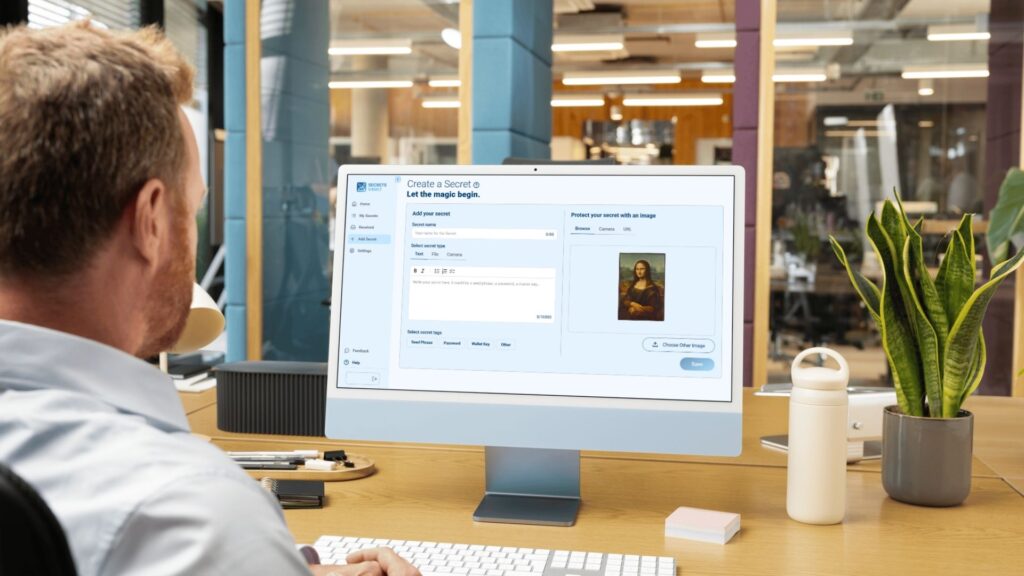
Secrets Vault’s Visual Safeguard introduces a new model for business data protection, one that doesn’t compromise privacy.
Instead of passwords, it uses an image you choose as the encryption and access key. No third-party has access. You’re in full control, even in the event of a lost device or compromised email account.
Use it to secure:
- Master credentials & API keys
- Disaster recovery plans
- Legal and compliance-sensitive documents
- Client files & intellectual property
This privacy-first solution empowers your business to meet modern cybersecurity demands without sacrificing usability. The image of your choice can be hidden in plain sight, as it is not altered, so you may have multiple copies, even on your social media.
Secrets Vault is EU-based company, fully regulated under European Union rules, and using a private hosting located in Spain and operated by an EU original company too.
This means your data benefits from:
- ✅ Full GDPR protection
- ✅ No exposure to U.S. extraterritorial laws
- ✅ Local data residency under Spanish and European jurisdiction
- ✅ Greater legal certainty for compliance and audits
- ✅ Faster regional access and lower latency for EU-based teams
Unlike U.S. providers, we are not subject to laws like the CLOUD Act. This gives you greater confidence in your legal and operational control over your sensitive data.
Think again about your sensitive business data in the cloud
Would you leave your office doors wide open? Or your secret sauce sitting on the top of the table?
Then don’t treat your most sensitive data with less caution.
Choose security solutions that reflect what’s at stake, and align with your legal, operational, and ethical responsibilities.
🔐 Learn more at: https://secretsvault.com the most user-friendly encryption mechanism in the market, built for privacy without compromise.