


Skip links

Post-Quantum Passwordless Authentication

Secrets Vault Identity let you turn any image into a powerful authentication factor or recovery key, supporting passwordless login, MFA, passkeys, and more. Boost your login security without requiring users to install software or rely on special hardware.

How it works
visual-passcodes-en

Reinventing authentication beyond traditional systems

Conventional systems rely on outdated methods like passwords and static codes that are vulnerable, frustrating, and easy to forget.

That’s why at Secrets Vault, we take a different path.

We introduce a visual credential called a Keepic: a personal image the user selects and recognizes. This image becomes a multi-purpose key for: password-free access, image-based 2FA, frictionless recovery, passkey roaming, and soft-token verification.

This image acts as both “something you have” and “something you know”, replacing or complementing passwords, tokens, codes or biometrics.

The result: a flexible visual key that adapts to your needs, whether it’s login, verification or recovery, while enhancing experience and reducing friction.

How authentication works today

Most authentication systems verify a user’s identity through a combination of factors:

Something you know

Like a password, PIN, or an image recognized by the user.

Something you have

Such as a phone, token or an image the user possesses.

Something you are

Biometric data, like fingerprints or facial recognition.

By aligning visual authentication with established authentication standards, Secrets Vault ensures seamless integration, stronger security, and better usability, without compromising compliance or control.

Post-quantum passwordless authentication
use cases

Edge biometrics authentication

A new enterprise authentication model where biometrics are never stored or transmitted and identity is proven with post-quantum cryptography.

• Eliminates biometric data risk from IAM architectures.

• Removes device dependency from authentication.

• Simplifies MFA with biometric presence verification.

• Strong post-quantum cryptographic authentication at the edge.

Learn more

Passwordless access

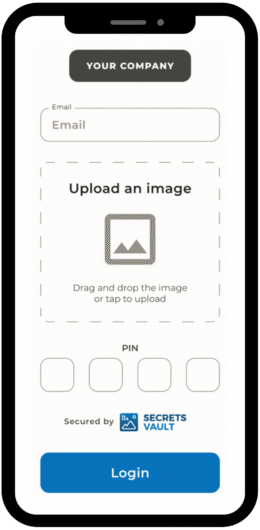
Simplify login experiences and reduce password fatigue by replacing traditional credentials with an image (Keepic) and a PIN, pattern or Face ID.

• Strong authentication without passwords.

• No software or hardware required.

• Lower help desk costs and improved user experience.

• NIS2-compliant with no token logistics.

Secrets Vault

Passwords

HW tokens​

Passkeys

# of factors​

Something I have​
Something I know​

Something I know

Something I have​
Something I know​

Something I am / know​
Something I have

Usability​

High​

Medium

High​

Very high (unless fall back is required)​

Security - ATO​

Very high

Poor​
(many compromises)​

Very high​

Very high​

NIS2 compliant​

Yes

No​

Yes

Yes

Additional elements​

No

No​

Hardware token​
(special app)​

Hardware device​
(special app)​

Roaming / multidevice​

Very high​

Very high​

High

Low ​
(unless within ecosystem)​

Cost (assuming BYOD)​

Medium

Very low

High​
(device, logistics)​

Medium – High​
(deployment, operation)​

Legacy deployment​

Easy

Complex

Complex

Easy

MFA with images

Use an image (Keepic) as a second factor to strengthen authentication. Reduce risks from phishing, compromised social logins and ATO (Account Takeover).

• Frictionless and secure MFA. NIS2-compliant.

• Superior to email/SMS/TOTP 2FA with higher resilience.

Secrets Vault

Email

SMS

TOTP

Usability

High

High to Medium​
(PIN or magic link)​

Average​

Low​

Security - ATO

Very high

Poor​
(compromised email)​

High​
(SIM swapping)​

Very high​

Security - Pishing

Medium

(site impersonation)

Poor​

Poor​

Medium​
(site impersonation)​

Additional software

No

Yes​
(email client)​

Yes​
(SMS app)​

Yes​
(requires TOTP app)​

Additional hardware

No

No​

Yes​
(requires a phone)​

Usually ​
(may require a smartphone)​

Cost (assuming BYOD)

Medium

Low​

Medium​

Low – Medium​
(free options available)​

Independency from third-party systems

High​
(on prem)​

High​

Poor​
(3rd party gateway)​

High​

Reliability & Resilience

High

High​

Medium​
(delays)​

High & Low​

Recovering system access

Streamline account resets and unlock employees, providers, or customers by using an image-based validation process.

• Reduce help desk costs for account recovery.

• Faster and more intuitive resets.

• Stronger validation than email or recovery questions.

Simple passkey roaming

Enable passkey login across devices in hybrid environments without relying on third-party sync. A single image enrollment ensures continuity across endpoints.

• Seamless roaming with centralized control.

• No hardware or external apps.

• Secure, device-independent access.

How our post-quantum passwordless authentication system enables secure access

secrests-vault-secure-and-manage-your-passwords

Step 1: Activate imaged-based authentication

Whether signing up, setting up two-factor authentication, or enabling recovery options, users are prompted to activate visual authentication on any supported platform.

secrets-vault-protect-your-sensitive-photos

Step 2: Image selection

Users select a personal image, what we call a Keepic. The Keepic can be complemented with another factor, such as a PIN, pattern, or biometrics. This image becomes a trusted key for secure access, user verification, and account recovery.

secrets-vault-protect-your-wallet-seed-phrases

Step 3: Link image to protected data

The Keepic is used to generate unique cryptographic keys, linked to the digital identity of the user.

secrets-vault-preserve-your-familys-prized-secrets

Step 4: Store the Keepic anywhere

The Keepic remains unmodified: an innocuous image to anyone who sees it. It can be stored in multiple locations, even shared publicly, without compromising security.

secrets-vault-share-confidential-documents

Step 5: Access, verify or recover

With just a username and the right Keepic, users can log in, verify identity with 2FA, recover access to blocked accounts, or use passkeys in multiple environments. Simple and secure.

How our IAM solution enables secure access with images

Key features of our post-quantum passwordless authentication solution

Diseño sin título (13)

Simple & compliant

• Improved user experience; no software or hardware needed for users.

• Simple to deploy and interact via Identity Provider or API.

• Fully cloud-ready (EU) or on-premises compatible.

• Complies with key regulations including GDPR and NIS2.

• Works seamlessly across environments and platforms.

Diseño sin título (12)

Advanced security

• One-device cryptographic operations.

• One-time pad encryption with very high entropy.

• Resilient to altered versions of the Keepic (e.g., compression or resizing).

• Zero-knowledge verification ensures no data is exposed.

• Quantum-resistant cryptography for future-proof protection.

Get in touch with our team

contact us

Secrets Vault Identity FAQ’s

The image alone is one of the authentication factors. To access your account, an attacker would also need the rest of factors, like your username and PIN, pattern, or biometrics (for passwordless access), or your username and password (for 2FA). Without those, the image can’t be used to authenticate or recover anything.

Also, guessing the correct image is extremely difficult; your image remains unchanged, and there’s no visual clue or exposed data that could help someone figure it out, not even Artificial Intelligence algorithms.

Absolutely. Secrets Vault Identity implements post-quantum cryptographic protocols and can be easily integrated into  enterprise IAM platforms using common standards, such as OIDC. It is also compliant with privacy standards like GDPR and NIS2, suitable for regulated industries.

Yes. You can easily update your image (Keepic) by authenticating and selecting a new image. The previous one is invalidated instantly.

Never. Secrets Vault Identity never sees, stores, or uploads your image. Only you know which image you’ve chosen. You can keep it wherever you want: on your device, in the cloud, on social media, even on a public website.

So how does it work?
Our system generates a cryptographic key from your image locally on your device. This generation is mathematically irreversible, meaning it cannot be traced back to the original image, even by us.

Technically, yes. Even if you reuse the same image, each app will generate a unique cryptographic key, making image-based authentication significantly more secure than traditional passwords. It’s inherently resistant to data breaches, dictionary attacks, rainbow tables, password stuffing, and more.

That said, for maximum security, we recommend using different images for different services, just as you would with strong, unique passwords.

The image itself holds no visible or extractable data; it remains clean and independent of the sensitive information it protects. Since nothing is stored or embedded in the image, attackers have no useful entry point. Combined with rate limiting, this makes brute-force attempts ineffective.

Yes. Our OIDC-compliant Identity Provider and API make it easy to integrate Secrets Vault Identity into your SaaS platforms, internal applications, or authentication systems. We also offer commercial support and custom integrations through our network of qualified partners.

Privacy Summary

This website uses cookies so that we can provide you with the best possible user experience. The cookie information is stored in your browser and performs functions such as recognizing you when you return to our site or helping our team understand which sections of the site you find most interesting and useful.