
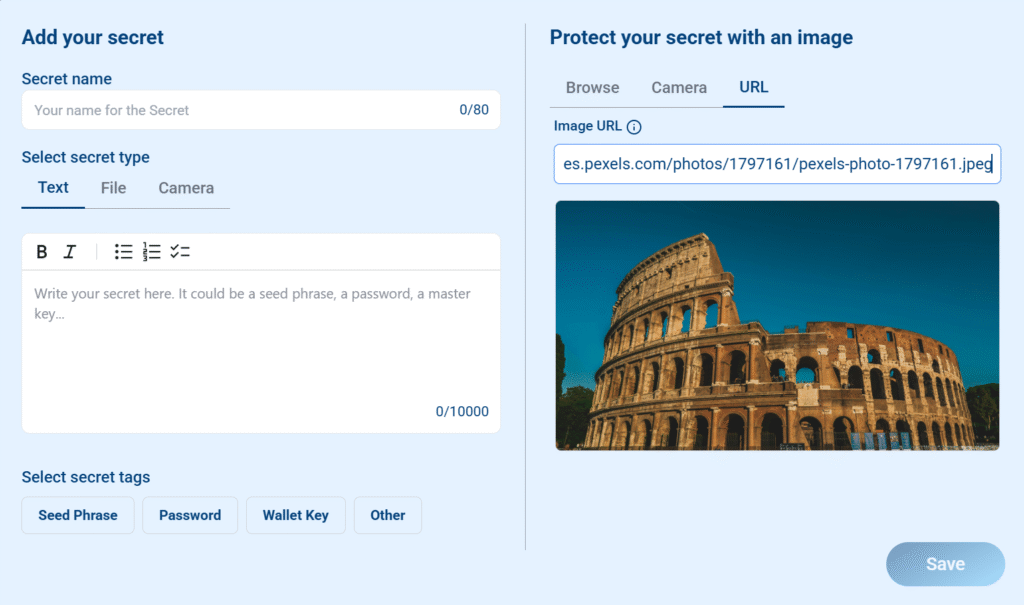
Secrets Vault uses images to protect every secret you create. These images are called Keepics. Until recently, you had to upload an image from your device. Now, you can simply paste a direct image URL, making the process faster and more convenient.
This feature relies on a web security technology called CORS (Cross-Origin Resource Sharing), which limits how images from other websites can be used. This guide explains how to use image URLs, what to do when they don’t work, and where to find CORS-friendly images.
How to Add a Keepic Using a URL #
- Copy the direct image URL
This must be a link to the actual image file, ending in.jpg,.png,.webp, etc.
Example: https://images.pexels.com/photos/1797161/pexels-photo-1797161.jpeg - Paste the URL into the Keepic tab
When creating a secret, you can now choose between three options for your Keepic: Browse, Camera, or URL. Select “URL” and paste the link. - Check the image preview
If the image loads, you’re good to go! You can now use this image to visually protect your secret.
Why Some Image URLs Don’t Work #
If you see the message “Failed to fetch image”, even though the link is correct, the issue is likely related to CORS.
CORS is a browser security feature that blocks images and other content from being loaded across websites unless the original site allows it.
Secrets Vault cannot bypass CORS restrictions.
If a website blocks cross-origin access, the image will not load in Secrets Vault, even if it displays correctly in your browser.
Recommended Sources for CORS-Compatible Images #
These websites allow cross-origin image access, so their images are safe to use directly in Secrets Vault:
| Site | Link | Description |
|---|---|---|
| Unplash | unplash.com | High-quality stock photography |
| Pexels | pexels.com | Free photos and videos |
| Pixabay | pixabay.com | Photos, vectors, illustrations |
| Lorem Picsum | picsum.photos | Random or styled placeholders |
➡️ Feel free to explore other websites too! Many platforms host public images, and some may support CORS even if they’re not listed here. Just paste the URL and see if the image loads. Testing a few options is a great way to discover new sources that work well with Secrets Vault.
Tips and Workarounds #
- If the image URL doesn’t load:
Download the image and upload it manually using the “Browse” option. - Sharing with others:
You can still share the original URL with someone so they can download and use the same image themselves.


